Problem Solving and Python Programming: UNIT I: Computational Thinking and Problem Solving
Notation
Pseudo Code, Flow Chart, Programming
Pseudocode is an artificial and informal language that helps programmers develop algorithms. Pseudocode is a "text-based" detail (algorithmic) design tool.
Notation
AU
: Jan.-18, May-19, Dec.-19, Marks 8
The
algorithmic specification is given by,
1.
Pseudo Code
2.
Flow Chart
3.
Programming Languages Let us discuss them in detail
1. Pseudocode
Pseudocode
is an artificial and informal language that helps programmers develop
algorithms. Pseudocode is a "text-based" detail (algorithmic) design
tool.
•
The rules of Pseudocode are reasonably straightforward. All statements showing "dependency"
are to be indented. These include while, do, for, if, switch.
For
example
Example
(1)
If
student's age > 18
Print
"Adult"
else
Print
"Not an Adult"
Example
(2)
Set
sum:=0 Set
counter:=
1
While
counter < = 10
Input
the num sum:= sum+num
increment
counter by 1 print the sum of 10 numbers
2. Flow Chart
•
Flowcharts are the graphical representation of the algorithms.
•
The algorithms and flowcharts are the final steps in organizing the solutions.
•
Using the algorithms and flowcharts the programmers can find out the bugs in
the programming logic and then can go for coding.
•
Flowcharts can show errors in the logic and set of data can be easily tested
using flowcharts.
Symbols
used in Flowchart
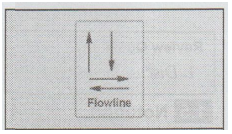
Flow
lines are used to indicate the flow of data. The arrow heads are important for
flowlines. The flowlines are also used to connect the different blocks in the
flowchart.
These
are termination symbols. The start of the flowchart is represented by the name
of the module in the ellipse and the end of the flowchart is represented by
the keywords End or Stop or Exit

The
rectangle indicates the processing. It includes calculations, opening and
closing files and so on.

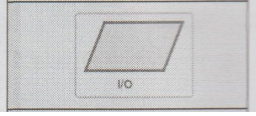
The
parallelogram indicates input and output.
The
diamond indicates the decision. It has one entrance and two exits. One exit
indicates the true and other indicates the false,

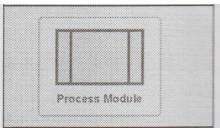
The
process module has only one entrance and one exit.
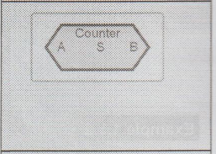
This
polygon indicates the loop A indicates the starting of the counter S indicates
the step by which the counter is incremented or decremented B indicates the
ending value of the counter Using the counter the number of times the looping
instruction gets executed.
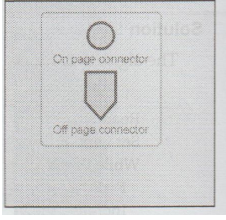
The
on-page connector connects the two different sections on the same page. A
letter is written inside the circle. The off-page connector connects the two
different sections on the different pages. The page numbers are used in
off-page connector. These two symbols should be used as little as possible
because then the readability of the flowchart may get affected.
Example
1.5.1 Draw the flowchart for sum of elements in an
array.
Solution
:

Fig.
1.5.1 Flowchart for sum of elements in array
Example
1.5.2 Convert the algorithm for computing factorial of
given number.
Solution
:
The
algorithm for computing factorial of given number is
Read
N
Set
i and F to 1
While
i < = N
F
= F*i
Increase
the value of i by 1
Display
F
End

Fig.
1.5.2 Flowchart for factorial
Example
1.5.3 Draw a flow chart to accept three distinct
numbers, find the greatest and print the result.
AU
: Jan.-18, Marks 8
Solution
:

Fig.
1.5.3
Example
1.5.4 Draw flow chart to find the sum of series 1 + 2
+ 3 + 4 + 5 ...... + 100.
AU
: Jan.-18, Marks 8
Solution
:
See Fig. 1.5.4 on next page.
3. Programming Languages
Definition
: Programming
languages are formal languages that have been designed to express computations.
There
are various programming paradigm,
1.
Imperative or procedural programming
2.
Object oriented programming
3.
Functional programming
4.
Logic programming.

Fig.
1.5.4
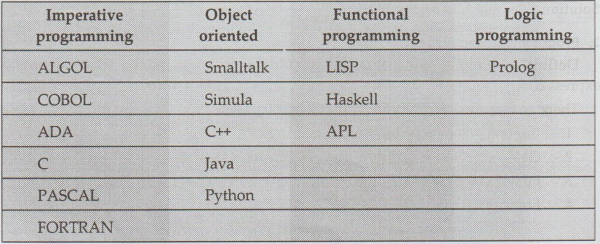
Examples
of various programming languages based on the above mentioned paradigm is as
shown by following table
1.
Imperative Programming Languages
•
The imperative programming is also called as procedural programming language.
•
A program consists of sequence of statements. After execution of each statement
the values are stored in the memory.
•
The central features of this language are variables, assignment statements, and
iterations.
•
Examples of imperative programming are - C, Pascal, Ada, Fortran and so on.
2.
Object Oriented Programming Languages
•
In this language everything is modeled as object. Hence is the name.
•
This language has a modular programming approach in which data and functions
are bound in one entity called class.
•
This programming paradigm has gained a great popularity in recent years because
of its characteristic features such as data abstraction, encapsulation,
inheritance, polymorphism and so on.
•
Examples of object oriented programming languages are - Smalltalk, C++, Java,
3.
Functional Programming
•
Computations of functional languages are performed largely through applying
functions to values, i.e., (+ 10 20). This expression is interpreted as 10 +
20. The result 30 will be returned.
•
For building more complex functions the previously developed functions are
used. Thus program development proceeds by developing simple function
development to complex function development.
•
Examples of function programming are LISP, Haskell, ML
4.
Logic Programming
•
In this paradigm we express computation in terms of mathematical logic only. It
is also called as rule based programming approach.
•
Rules are specified in no special order.
•
The logic paradigm focuses on predicate logic, in which the basic concept is a
relation.
•
Example of Logic programming is Prolog.
Review Questions
1. List the symbols used in drawing the flowchart.
AU : May-19, Marks 2
2. What is the use of algorithm, flowchart and pseudo code in
the perspective of problem solving ?
AU : Dec.-19, Marks 2
Problem Solving and Python Programming: UNIT I: Computational Thinking and Problem Solving : Tag: Engineering Python : Pseudo Code, Flow Chart, Programming - Notation
Related Topics
Related Subjects
Problem Solving and Python Programming
GE3151 1st Semester | 2021 Regulation | 1st Semester Common to all Dept 2021 Regulation