C Programming and Data Structures: Unit IV: a. Non-Linear Data Structures - Trees
Trees
Basic Terminologies | Non-Linear Data Structures
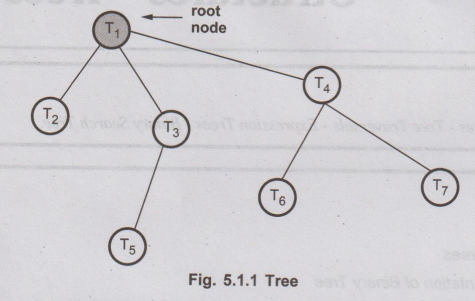
A tree is a finite set of one or more nodes such that - i) There is a specially designated node called root.
Trees
A
tree is a finite set of one or more nodes such that -
i)
There is a specially designated node called root.
ii)
The remaining nodes are partitioned into n> = 0 disjoint sets T1,
T2,T3...Tn where T1, T2,T3...Tn
are called the sub-trees of the root.
The
concept of tree is represented by following Fig. 5.1.1.
Various
operations that can be performed on the tree data structure are
1.
Creation of a tree
2.
Insertion of a node in the tree as a child of desired node.
3.
Deletion of any node(except root node) from the tree.
4.
Modification of the node value of the tree.
5.
Searching particular node from the tree.
1. Basic Terminologies
Let
us get introduced with some of the definitions or terms which are normally
used.
From
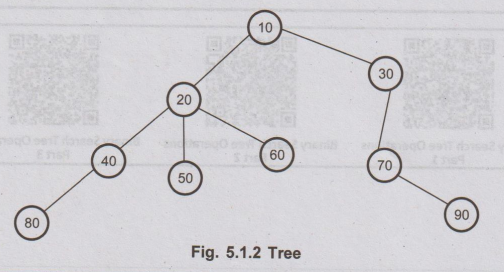
Fig. 5.1.2,
1.
Root
Root
is a unique node in the tree to which further subtrees are attached. For above
given tree, node 10 is a root node.
2.
Parent node
The
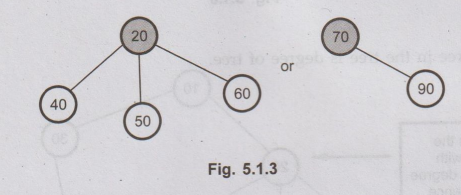
node having further sub-branches is called parent node. In Fig. 5.1.3 the 20 is
parent node of 40, 50 and 60.
3.
Child nodes
The
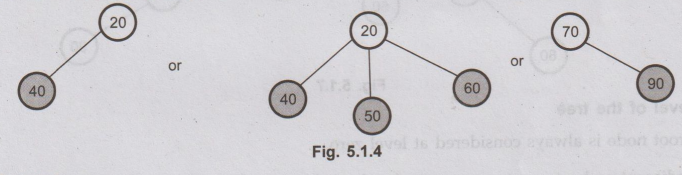
child nodes in above given tree are marked as shown below -
4.
Leaves
These
are the terminal nodes of the tree.
For
example -

5.
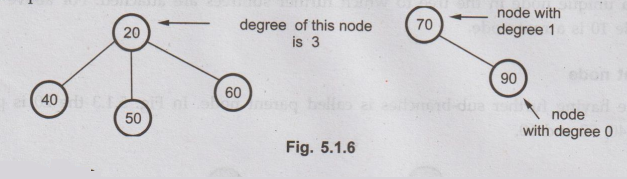
Degree of the node
The
total number of subtrees attached to that node is called the degree of a node.
For
example.
6.
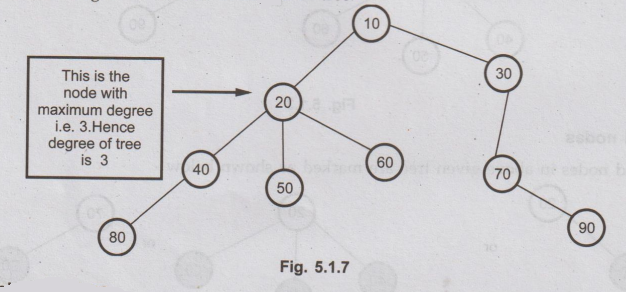
Degree of tree
The
maximum degree in the tree is degree of tree.
7.
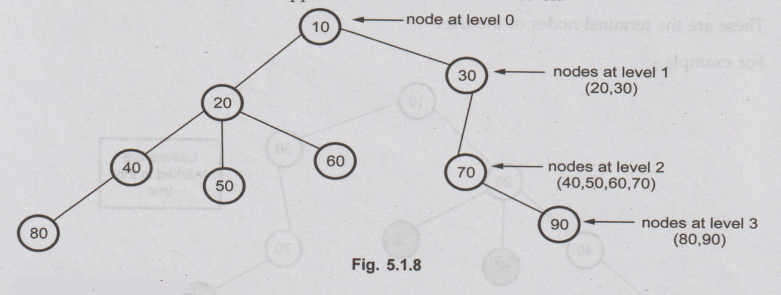
Level of the tree
The
root node is always considered at level zero.
The
adjacent nodes to root are supposed to be at level 1 and so on.
8.
Height of the tree
The
maximum level is the height of the tree. In Fig. 5.1.8 the height of tree is 3.
Sometimes height of the tree is also called depth of tree.
9.
Predecessor
While
displaying the tree, if some particular node occurs previous to some other node
then that node is called predecessor of the other node.
For
example: While displaying the tree in Fig. 5.1.8 if we read
node 20 first and then if we read node 40, then 20 is a predecessor of 40.
10.
Successor
Successor
is a node which occurs next to some node.
For
example: While displaying tree in Fig. 5.1.8 if we read node
60 after reading node 20 then 60 is called successor of 20.
11.
Internal and external nodes
Leaf
node means a node having no child node. As leaf nodes are not having further
links, we call leaf nodes External nodes and non leaf nodes are called internal
nodes.

12.
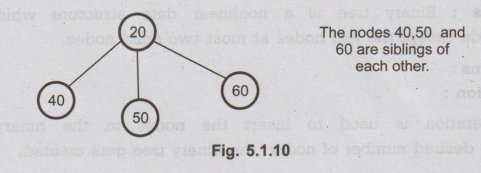
Sibling
The
nodes with common parent are called siblings or brothers.
For
example
In
this chapter we will deal with special type of trees called binary trees. Let
us understand it.
C Programming and Data Structures: Unit IV: a. Non-Linear Data Structures - Trees : Tag: : Basic Terminologies | Non-Linear Data Structures - Trees
Related Topics
Related Subjects
C Programming and Data Structures
CS3353 3rd Semester EEE, ECE Dept | 2021 Regulation | 3rd Semester EEE Dept 2021 Regulation